> ## Documentation Index
> Fetch the complete documentation index at: https://docs.thefaithapp.com/llms.txt
> Use this file to discover all available pages before exploring further.
# Prayer and spiritual practices
> Create church-shaped prayer, reflection, fasting, lament, calendar, rest, and promise-review experiences.
# Prayer and spiritual practices
Spiritual practices give members a formation rhythm beyond a class. Your
church prepares the invitation, language, and structure; members decide how
and when to participate.
Start with one practice your church can pastor well. Test it with staff before
publishing it to members.
## Daily Office
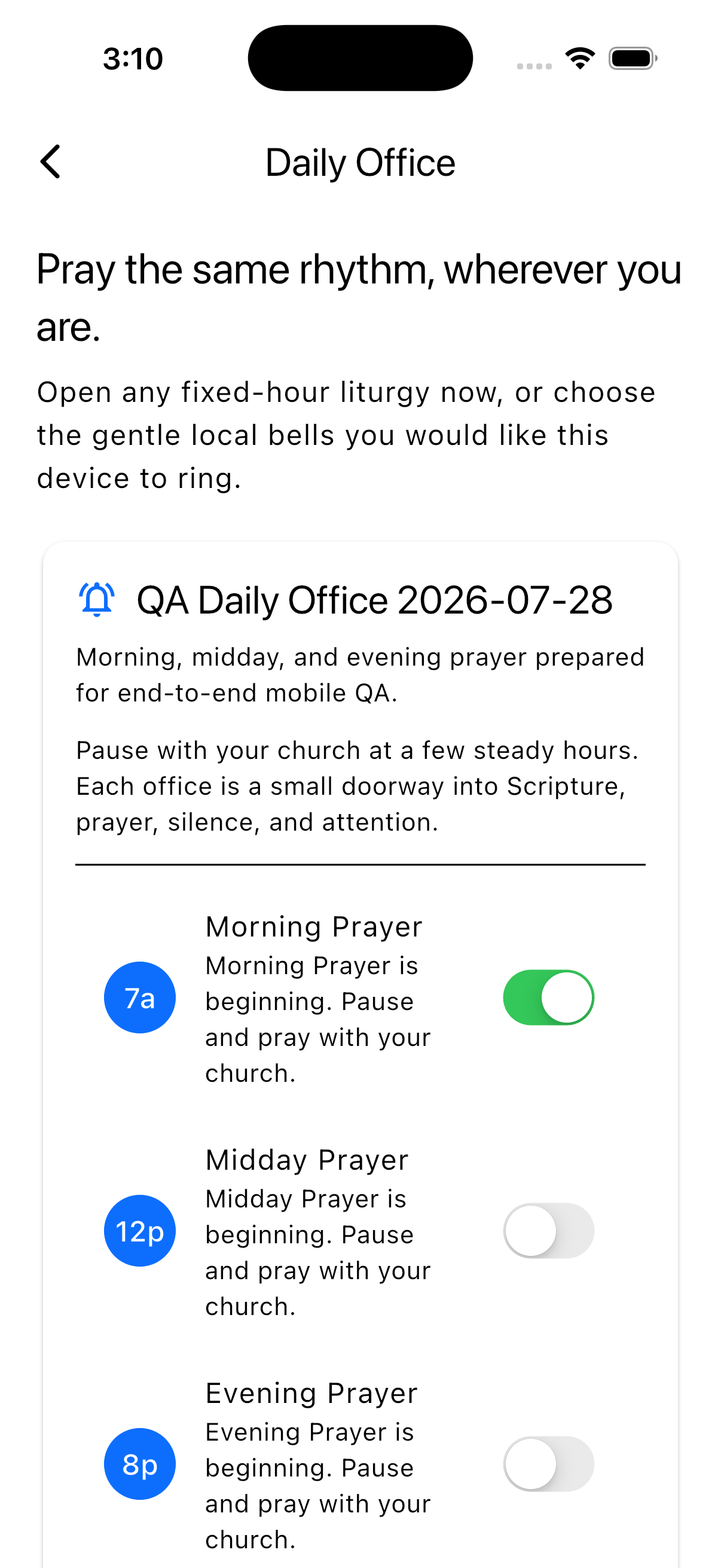
Open **Discipleship → Daily Office → New plan**. Configure:
* Title, active dates, and IANA timezone.
* Up to eight fixed prayer hours and their gentle bell invitations.
* Introduction and full order of prayer.
* Headings, readings, Scripture, prayers, responses, and timed silence.
* Draft, active, or archived availability.
Members choose which hours ring on their own device. Active liturgies are saved
for offline use, and the local bell schedule refreshes when Daily Office opens.
 Live presence is anonymous and temporary. A member may see **You and 3 others
are praying now** while an office is open. Staff cannot see identities, bell
choices, individual presence, or attendance history.
## Guided Examen
Open **Discipleship → Guided Examen → New Examen**. Configure:
* Title and suggested evening time.
* Opening and closing words.
* Ordered reflection steps and guidance.
* Presence, gratitude, review, consolation, desolation, forgiveness, tomorrow,
or custom step types.
* Optional or required written responses.
* Automatic deletion from one hour to 30 days.
* Draft, active, or archived availability.
Every Examen must include gratitude and desolation. The church owns the
remaining language and order.
The deletion clock starts when the member begins; completion does not extend
it. Responses are encrypted and owner-only. The member may delete early, and
the platform permanently deletes the full session at expiry. Staff cannot
inspect responses, participant names, or completion activity.
## Congregational fasts
Open **Discipleship → Congregational Fasts → New fast**. Configure:
* A one-to-90-day window and church timezone.
* Invitation, safety guidance, and closing blessing.
* At least one shared standard and one body-safe substitution.
* Up to eight total participation practices.
* Daily Scripture, reflection, and prayer.
* Draft, published, or archived availability.
Every option is presented as full participation. Members choose privately and
are never asked to submit a health reason.
Selected practices and daily check-ins are encrypted and owner-only. Staff see
only a total participant count—not names, choices, or check-ins. Leaving the
fast permanently deletes that member's participation record.
Write the safety guidance before writing the fast invitation. Include
substitutions that are genuinely accessible and encourage members to follow
appropriate medical advice.
## Lament and Wall of Tears
Open **Discipleship → Lament & Wall of Tears → New liturgy**. Configure:
* Invitation, opening, and closing words.
* Ordered psalm, naming, protest, petition, silence, or custom movements.
* Whether the optional Wall of Tears is available.
* Wall heading, introduction, and offering prompt.
* Permanent deletion from one to 365 days.
* Draft, active, or archived availability.
Every liturgy retains at least one psalm and one naming movement. It does not
force grief toward a quick conclusion.
Private writing inside the liturgy stays only in memory on the current mobile
screen and is never uploaded. The Wall of Tears uses a separate blank field;
private words are never copied into it.
A wall offering is encrypted and waits for moderation. If approved, it appears
without the author's name. Moderators see the author only when the member
explicitly permits pastoral follow-up. Approval never extends the deletion
date, and the member may permanently delete the offering sooner.
## Living Church Calendar
Open **Discipleship → Church Calendar → New church year**. The included dates
are an editable Western-calendar example. Review every date against your
church tradition before activation.
Configure:
* Church-year title, description, dates, and timezone.
* Member welcome.
* Two to twelve non-overlapping seasons.
* Each season's name, dates, color, tone, invitation, and Scripture.
* Up to eight prayer, Scripture, generosity, fasting, service, rest,
reflection, or custom practices per season.
* Daily, weekly, once-per-season, or flexible rhythm.
* Draft, active, or archived availability.
Only one church year may be active at a time. The member companion uses the
church timezone to move from one season to the next.
The calendar stores no attendance, completion, streak, or spiritual score.
## Sabbath and Retreat
Open **Discipleship → Sabbath & Retreat → New rest guide**. Configure:
* Sabbath or retreat type.
* Members, clergy, or everyone as the intended audience.
* Default duration from 30 minutes to seven days.
* Opening and closing invitations.
* Scripture reference.
* One to eight suggested practices.
* Draft, active, or archived availability.
Members decide whether to start, may change the duration, and can end early.
Only the current rest window is retained; expired and ended windows are
removed. Staff receive no participation analytics.
Notification protection is partial. Rest mode mutes the church-wide
broadcast topic on the member's device, including while the app is closed.
Direct chat, care, prayer-room, volunteer, and other token-targeted alerts
are not muted yet. Clergy-device enforcement also depends on future unified
notification preferences and a signed-in staff mobile identity.
## Private Promise Ledger
Open **Discipleship → Promise Ledger → New invitation**. Configure:
* Title and explanation.
* A gentle private-review question.
* Review interval from one to 90 days.
* Whether to include active personal goals, committed Rule of Life promises,
or both.
* Draft, active, or archived availability.
The ledger reads only explicit structured commitments. It never scans journals
or infers promises from free-form writing.
Members can add an encrypted review note, snooze an item, set it aside, or
restore it. A review does not mark the source complete and creates no streak or
score. When the original goal or Rule of Life promise is no longer current,
its review state is removed.
The dashboard shows the invitation only—not member promises, notes, due counts,
or activity.
## Launch checklist for any practice
* The language sounds like your church and has been pastorally reviewed.
* Dates and timezone are correct.
* Privacy expectations are explained before participation.
* Safety language exists where the practice affects the body or sensitive
personal experience.
* A staff member completed the whole member flow on a phone.
* Draft, active, published, and archived states behave as expected.
* Your ministry knows how to respond if a member asks for help.
## Common problems
Confirm it is active or published, its date window includes today where
required, and the church timezone is correct.
This is intentional for private practices. Some workflows provide only an
anonymous total; others provide no participation analytics at all.
Confirm the member selected the prayer hour, allowed notifications on the
device, and reopened Daily Office after a plan or schedule change.
Direct and token-targeted notifications are outside the current partial
protection. The member app explains this boundary before rest begins.
Live presence is anonymous and temporary. A member may see **You and 3 others
are praying now** while an office is open. Staff cannot see identities, bell
choices, individual presence, or attendance history.
## Guided Examen
Open **Discipleship → Guided Examen → New Examen**. Configure:
* Title and suggested evening time.
* Opening and closing words.
* Ordered reflection steps and guidance.
* Presence, gratitude, review, consolation, desolation, forgiveness, tomorrow,
or custom step types.
* Optional or required written responses.
* Automatic deletion from one hour to 30 days.
* Draft, active, or archived availability.
Every Examen must include gratitude and desolation. The church owns the
remaining language and order.
The deletion clock starts when the member begins; completion does not extend
it. Responses are encrypted and owner-only. The member may delete early, and
the platform permanently deletes the full session at expiry. Staff cannot
inspect responses, participant names, or completion activity.
## Congregational fasts
Open **Discipleship → Congregational Fasts → New fast**. Configure:
* A one-to-90-day window and church timezone.
* Invitation, safety guidance, and closing blessing.
* At least one shared standard and one body-safe substitution.
* Up to eight total participation practices.
* Daily Scripture, reflection, and prayer.
* Draft, published, or archived availability.
Every option is presented as full participation. Members choose privately and
are never asked to submit a health reason.
Selected practices and daily check-ins are encrypted and owner-only. Staff see
only a total participant count—not names, choices, or check-ins. Leaving the
fast permanently deletes that member's participation record.
Write the safety guidance before writing the fast invitation. Include
substitutions that are genuinely accessible and encourage members to follow
appropriate medical advice.
## Lament and Wall of Tears
Open **Discipleship → Lament & Wall of Tears → New liturgy**. Configure:
* Invitation, opening, and closing words.
* Ordered psalm, naming, protest, petition, silence, or custom movements.
* Whether the optional Wall of Tears is available.
* Wall heading, introduction, and offering prompt.
* Permanent deletion from one to 365 days.
* Draft, active, or archived availability.
Every liturgy retains at least one psalm and one naming movement. It does not
force grief toward a quick conclusion.
Private writing inside the liturgy stays only in memory on the current mobile
screen and is never uploaded. The Wall of Tears uses a separate blank field;
private words are never copied into it.
A wall offering is encrypted and waits for moderation. If approved, it appears
without the author's name. Moderators see the author only when the member
explicitly permits pastoral follow-up. Approval never extends the deletion
date, and the member may permanently delete the offering sooner.
## Living Church Calendar
Open **Discipleship → Church Calendar → New church year**. The included dates
are an editable Western-calendar example. Review every date against your
church tradition before activation.
Configure:
* Church-year title, description, dates, and timezone.
* Member welcome.
* Two to twelve non-overlapping seasons.
* Each season's name, dates, color, tone, invitation, and Scripture.
* Up to eight prayer, Scripture, generosity, fasting, service, rest,
reflection, or custom practices per season.
* Daily, weekly, once-per-season, or flexible rhythm.
* Draft, active, or archived availability.
Only one church year may be active at a time. The member companion uses the
church timezone to move from one season to the next.
The calendar stores no attendance, completion, streak, or spiritual score.
## Sabbath and Retreat
Open **Discipleship → Sabbath & Retreat → New rest guide**. Configure:
* Sabbath or retreat type.
* Members, clergy, or everyone as the intended audience.
* Default duration from 30 minutes to seven days.
* Opening and closing invitations.
* Scripture reference.
* One to eight suggested practices.
* Draft, active, or archived availability.
Members decide whether to start, may change the duration, and can end early.
Only the current rest window is retained; expired and ended windows are
removed. Staff receive no participation analytics.
Notification protection is partial. Rest mode mutes the church-wide
broadcast topic on the member's device, including while the app is closed.
Direct chat, care, prayer-room, volunteer, and other token-targeted alerts
are not muted yet. Clergy-device enforcement also depends on future unified
notification preferences and a signed-in staff mobile identity.
## Private Promise Ledger
Open **Discipleship → Promise Ledger → New invitation**. Configure:
* Title and explanation.
* A gentle private-review question.
* Review interval from one to 90 days.
* Whether to include active personal goals, committed Rule of Life promises,
or both.
* Draft, active, or archived availability.
The ledger reads only explicit structured commitments. It never scans journals
or infers promises from free-form writing.
Members can add an encrypted review note, snooze an item, set it aside, or
restore it. A review does not mark the source complete and creates no streak or
score. When the original goal or Rule of Life promise is no longer current,
its review state is removed.
The dashboard shows the invitation only—not member promises, notes, due counts,
or activity.
## Launch checklist for any practice
* The language sounds like your church and has been pastorally reviewed.
* Dates and timezone are correct.
* Privacy expectations are explained before participation.
* Safety language exists where the practice affects the body or sensitive
personal experience.
* A staff member completed the whole member flow on a phone.
* Draft, active, published, and archived states behave as expected.
* Your ministry knows how to respond if a member asks for help.
## Common problems
Confirm it is active or published, its date window includes today where
required, and the church timezone is correct.
This is intentional for private practices. Some workflows provide only an
anonymous total; others provide no participation analytics at all.
Confirm the member selected the prayer hour, allowed notifications on the
device, and reopened Daily Office after a plan or schedule change.
Direct and token-targeted notifications are outside the current partial
protection. The member app explains this boundary before rest begins.